Hello AFO community. I am looking for some insight in using the Create a Note action.
I’m a newbie not only here in the AFO world but also the Obsidian world. I come here as a seasoned Evernote user looking to recreate some of the Evernote environment I enjoyed while looking forward to how Obsidian can improve it on my Mac, iPhone, and iCloud Drive.
One aspect I’m looking to recreate is the ability to create notes while hiking. I want to say, “Hey Siri. Create an Obsidian note.” In response, have Siri ask me for the title and for the note’s content. With that input, have the note created and saved in my only vault’s the top level _Inbox folder.
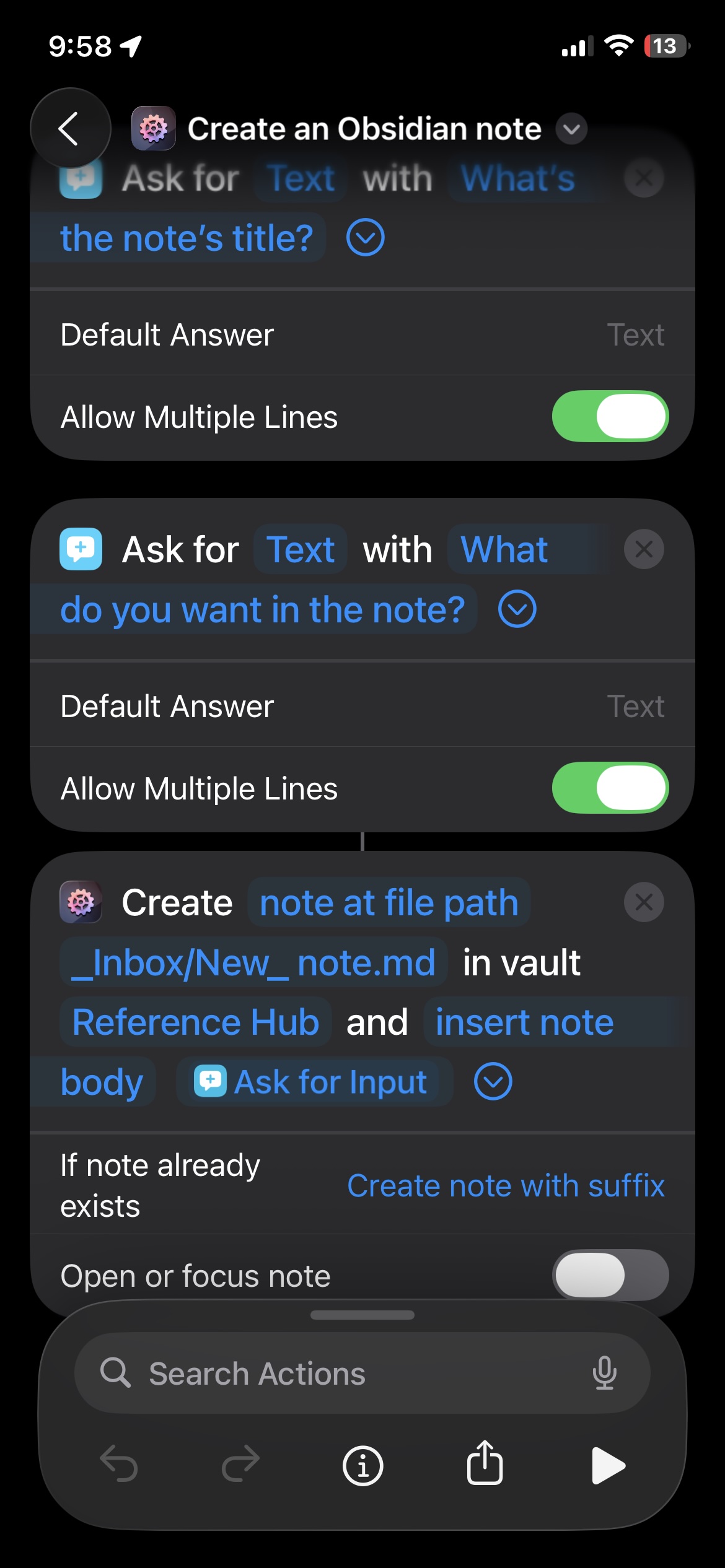
So, I created this simple Shortcut on my iPhone. (See attached.). It doesn’t work. No note is created and what I see after the data entry is inconsistent. Sometimes Obsidian is loaded and other times, I see my iPhone’s Home Screen.
I’m not understanding a few things…
1. I take it that while I’m asking for a note title, the action isn’t doing anything with it. Can it? Am I missing something?
2. I don’t understand why the inconsistency. What settings am I not taking into account?
I’ve looked at other Create a Note screen shots on this forum to see if I can glean any clues…but I didn’t see any. After all, the Create a Note action appears to be straightforward.
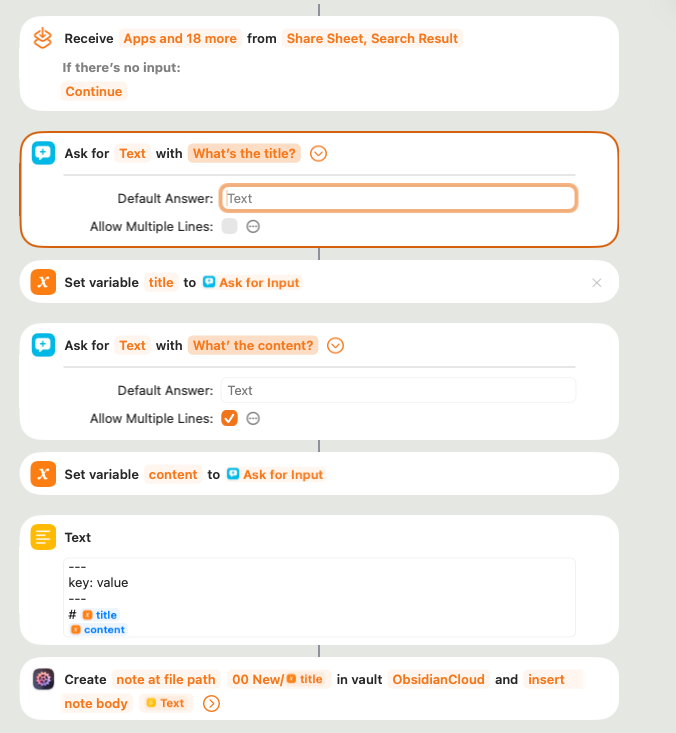
I think on issue is your asked first for the title, but don’t use the answer. The second “Ask for…” will use at the end. Are you sure with your path? Never the less, use do not add .md to the notes name, this will be added by AFO or Obsidian. This would be my solution:
I work with variable and build the body of the note in the Text Container, here you can add also a frontmatter, e.g. for tagging. I use the title for the name of the note as well, in my vault these are mostly the same…
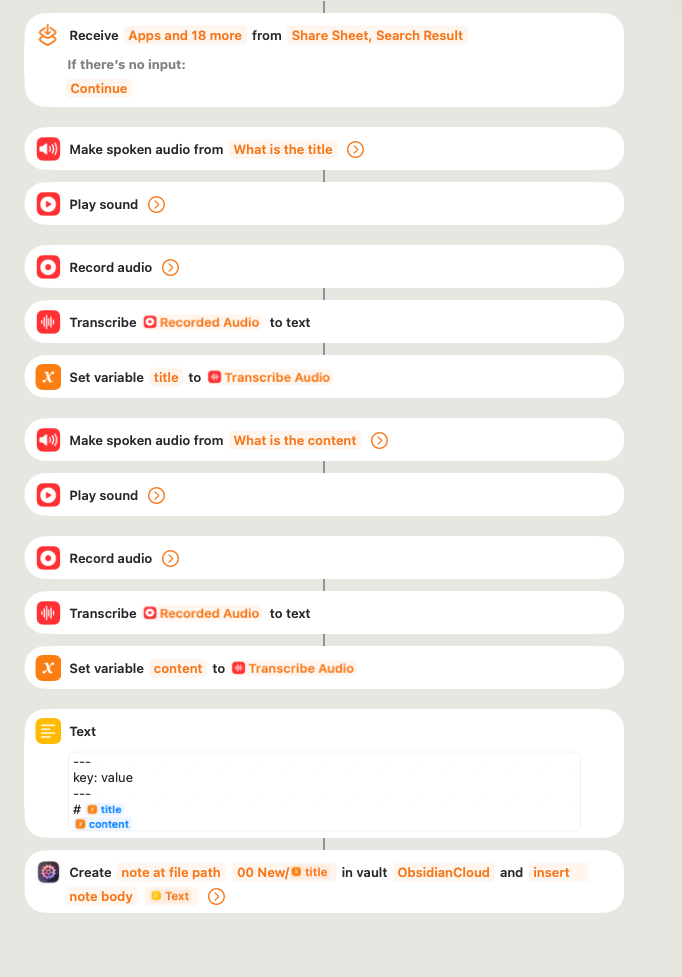
If you like you can do this also with Voice, unfortunately there are still some buttons to press.
In my experience, working with AFO and Obsidian via Siri is kind of unpredictable due to Siri being very hit’n’miss. Also, if the phone is still locked or showing the lock screen, it’s unlikely that the AFO action will be able to work because the Obsidian API is what I call a “foreground API”, meaning for it to work, Obsidian has to be the active app, or better said: if any app calls the Obsidian API, this will by design make Obsidian the frontmost app. And iOS requires that any app that calls Obsidian this way has to do it from the foreground as well.
And because an app can’t be in foreground and call another app when the device is locked, Siri and/or the workflow might simply fail. It should work if the device has been already unlocked (by Face ID, say) but is still showing the lock screen.
I wish I could tell you something else but these are the technical constraints laid out by Obsidian and iOS.
I take it that while I’m asking for a note title, the action isn’t doing anything with it. Can it? Am I missing something?
The note title in Obsidian comes from its file name. You’re setting your note title to “New_ note” in the Create Note action, disregarding the result of your first Ask For block entirely. If you want to use that as note title, set the File Path parameter of Create Note to “_Inbox/[Ask for…]” (the latter being the result of the first action). Also, deactivate the first Ask For block’s “Allow multiple lines” – remember, file name == note title, and neither can have a line break.
If you have more questions, or if this was not helpful, just let me know!
Thanks Carlo. I can appreciate the “hit’n’miss” experience. Let me play around a little more with what is provided here. My fallback path is to combine Siri and Apple Notes (which currently do along with Siri and Evernote) and then simply move the Apple Notes into Obsidian when appropriate.
On a tangent, I appreciate the community you’ve created with your products. It reminds me of Sitely, the web design product I use. Its online community is extremely helpful. I just hope I can ramp up the Obsidian learning curve to contribute back.
Well, after a few hours of experimenting, I am confirming your “hit or miss” conclusion. However, since being able to create Obsidian notes while hiking is important to me, I am not giving up. In looking for alternative approaches, I see “How to email a ‘Note to Self’ to your Obsidian vault” as a real possibility.
If I put in a Siri based front end to create the email, I am thinking this might be the alternative approach that will work.
I figured out how to get what I want without using Apple Mail and the Create a Note to Myself approach.
First off, using Apple Mail does not help me in anyway. The reason is because creating the content to pass to the Create Note action was never the issue. The issue is what you described:
“it’s unlikely that the AFO action will be able to work because the Obsidian API is what I call a “foreground API”, meaning for it to work, Obsidian has to be the active app, or better said: if any app calls the Obsidian API, this will by design make Obsidian the frontmost app. And iOS requires that any app that calls Obsidian this way has to do it from the foreground as well.”
Resolving the issue requires the right “environment” which means having the AFO app and Obsidian loaded — in that order, then initiating the Shortcut via Siri. Failure to create the “environment” means it won’t work. Create the “environment” and it does.
So, here is what initiates the workflow… “Hey Siri. Open the ActionsForObisidian app. Hey Siri. Open the Obsidian app. Hey Siri. Create an Obsidian note.”
I successfully tested this by unlocking my phone and going through the workflow. I then shut the phone off and from that state initiated the workflow again by simply saying “Hey Siri. Create an Obsidian note.” This was also successful — because both apps were loaded and Obsidian was the last app to e loaded.
If I am ever unsure of the “environment” is right or if it didn’t work, I simply use Siri to put it in the right state.
Caveats:
The phone needs to be unlocked — again something you called out.
The AFO app does not need to immediately precede the loading of Obsidian IF it has already been loaded. It just needs to be loaded.
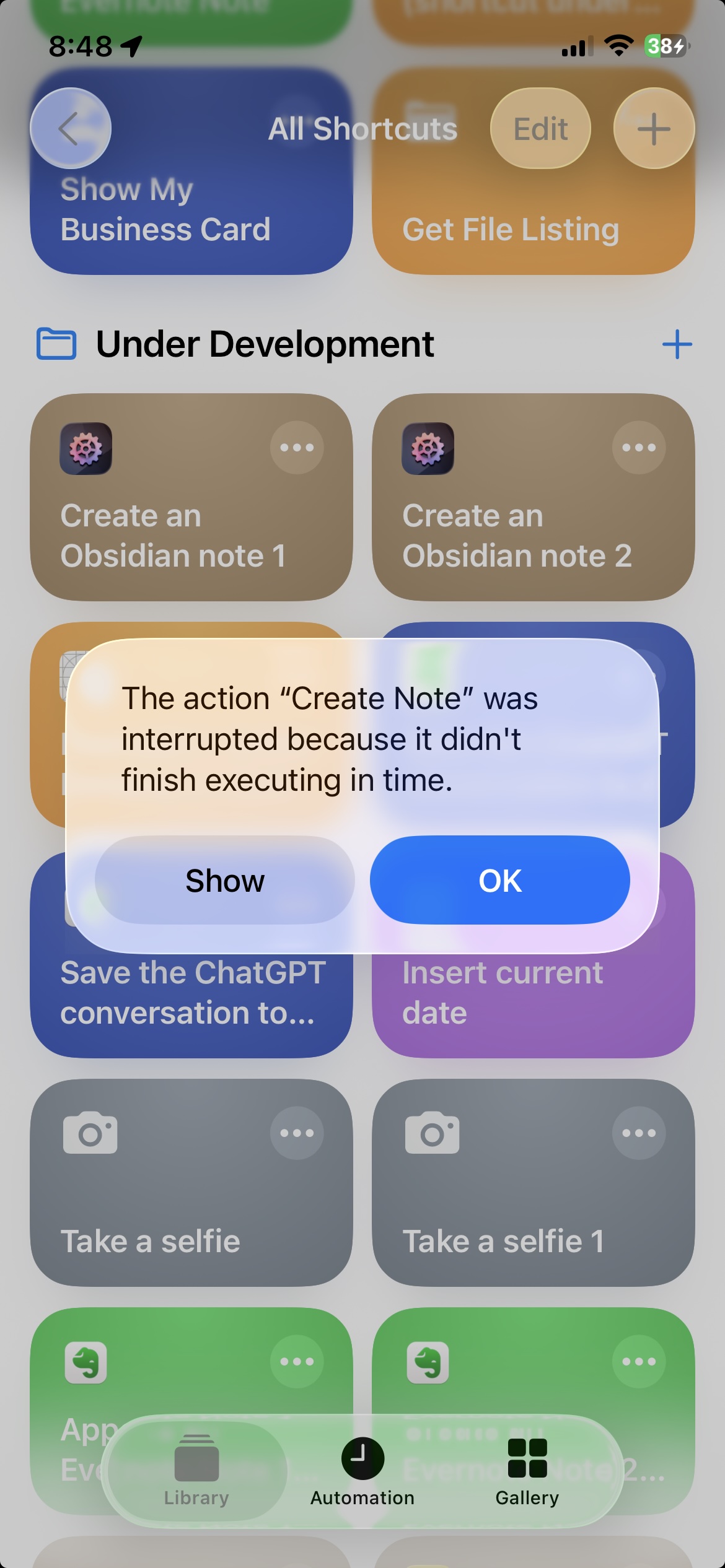
I want Siri to tell me the note is being created after the Create Note action. However, I see that it does not execute after the Create Note action. I assume no actions execute after the Create Note action. So, I put a Speak action just before the Create Note action.
If Create Note has to launch Obsidian first, then this might happen due to Obsidian launch overload, i.e. Obsidian starting up and dropping the incoming API call. To work around that, using a simple iOS-native “Open App” action at the beginning of the workflow usually does the trick, see this forum post. (Don’t be confused, the error description is different, the underlying cause is the same.)
I have a “Create an Obsidian note” that not only works via Siri (given the prerequisites), but I also have the Shortcut on an iPhone home page for even when I can type, the Shortcut on my dock for a way of adding a quick note without going into Obsidian, and…
I created an “Append to the last Obsidian note” Shortcut that can be put to use via the same avenues as “Create an Obsidian note”.
Nice!
Thanks for the insight.
p.s. In developing the Shortcuts on my Mac, I was often presented the AFO Home Screen. No matter how many times I would quit the app, it would pop up. Again, when I was developing in Shortcuts. Why was it doing that? Did it have anything to do with my trial period being over and I purchased a dual license only a few minutes prior?
In developing the Shortcuts on my Mac, I was often presented the AFO Home Screen. No matter how many times I would quit the app, it would pop up. Again, when I was developing in Shortcuts. Why was it doing that?
That’s on me. Short answer: it’s a bug.
Longer answer: Due to changes in macOS 26.1, in some circumstances the app wouldn’t stay open anymore, so I had to entirely rewrite the detection mechanism that decides when to show the app and when to keep it in the background. And while it works in general, it clearly needs some more tuning.
 Also, if the phone is still locked or showing the lock screen, it’s unlikely that the AFO action will be able to work because the Obsidian API is what I call a “foreground API”, meaning for it to work, Obsidian has to be the active app, or better said: if any app calls the Obsidian API, this will by design make Obsidian the frontmost app. And iOS requires that any app that calls Obsidian this way has to do it from the foreground as well.