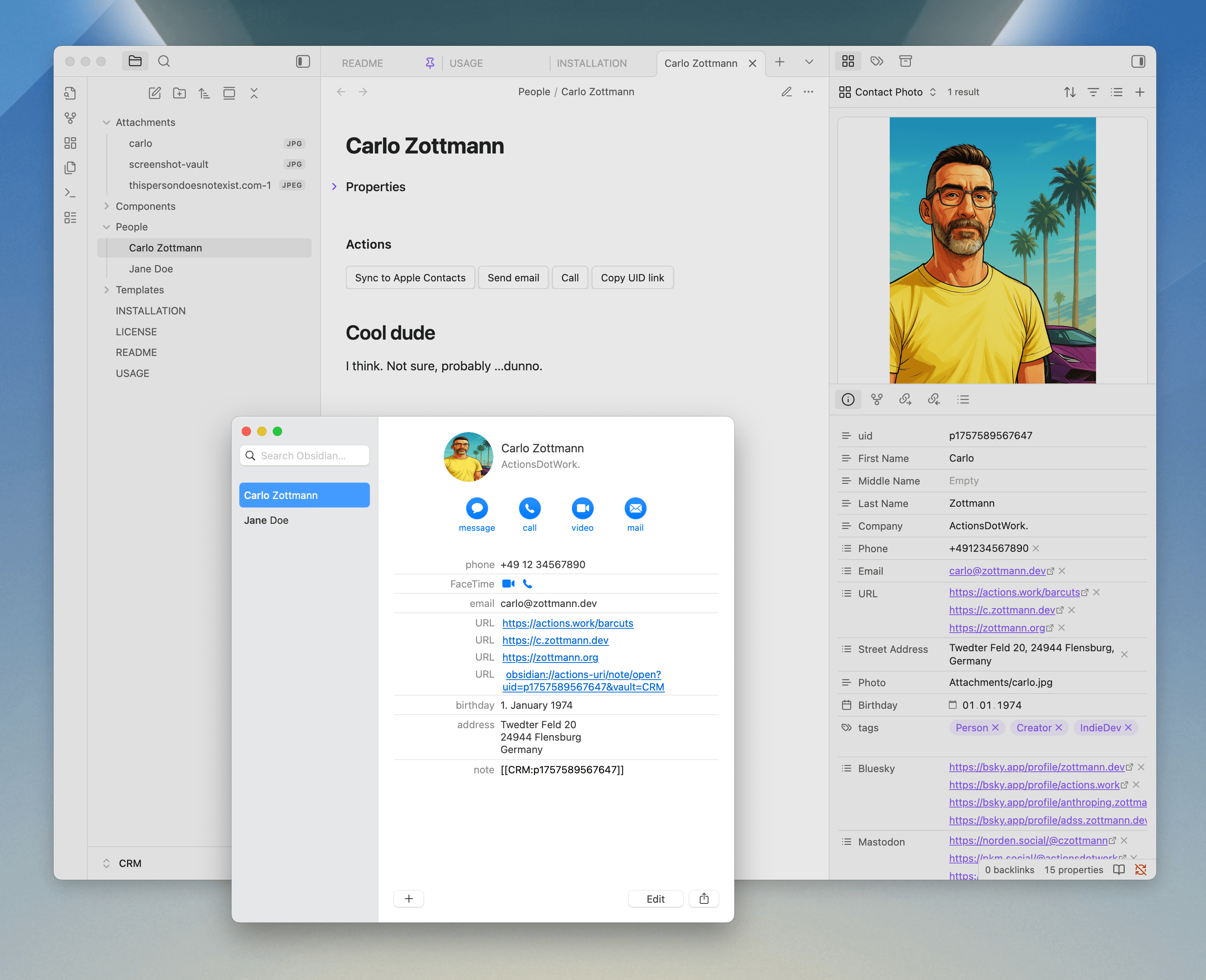
Yo. I’ve created a super-reduced contacts relationship management tool (“CRM”, too big a term for what this is, really). The big idea:
The source of truth is Obsidian, and it offers an easy selective sync to Apple Contacts (on macOS) using macOS Shortcuts. The sync’d entries in Apple Contacts contain a link back to their source notes.
This is a proof of concept. I wanted to keep my contacts in an Obsidian vault, notes and all, while still being able to use my macOS address book (Contacts.app) – and therefore iOS, thanks to iCloud.
It works for me, so I extracted it into a shareable vault:
… to give you a better idea – these were my ground rules:
This vault is the source of truth. It contains all the information and notes for all my contacts, one note per person.
I do not want all of my contacts in my address book because there are personal ones, customers, clients, etc. – and not all of them are relevant in that context.
I only want to sync a subset of the information contained in a contact note to its related address book entry: basically enough to identify callers, email senders, SMS senders etc. but not much more.
An address book entry contains a link back to its CN for easy access to the person’s details.
A contact note contains a clickable button that creates/updates the address book entry, c/o Apple Shortcuts.
Let me know what you think! I’ve slapped a “v1.0” on that thing but it could definitely use a couple of people poking it with sticks real good
Heads-up, frens: I’ve updated the vault a bit. A few README’s were added to help getting you started, and FAQs. Also:
Added optional, conditional, DataviewJS-powered display of contact picture below the action buttons, see Components/obsidian-people-contact-photo.js and the related DataviewJS block in Templates/Person.md.
Renamed Components/Contact Photo.base to Components/obsidian-people-contact-photo.base to bring it in line with the other component files and make its purpose clearer should you copy it to another vault
They’re independent from each other, and using them together has a high probability of screwing up either note or address book entry. So yes, pick one and save yourself some headaches.
A couple of questions that have come up as I’m implementing this into my vault.
What’s the best way to add several phone numbers to an entry and have them sync to Contacts?For a lot of my people I have main phone, direct line and sometimes mobile and fax numbers. I’d like them all to be in the contacts app. Not sure if I should add them as new properties or how to implement it.
I normally have a header on all my notes that is a link to the file name using templater plug-in implemented like this as the first line after the properties block
# [[<% tp.file.title %>]]
I get it to fill in initially by using Shift Option R to fill it all in after making a note.
I also use templater’s ability to set a note template based on the folder I create the note in but when I added my title above and also set a templater folder action that uses my modified people note template when I create a new note by right clicking the folder name and selecting new note the UID property does not populate. That means It cannot be synced to the Contacts app. I also tried using templater’s use a template based on the folder with the unmodified People.md note but got the same results
Is there any way to combine the use of templater with Obsidian People as described above?
What’s the best way to add several phone numbers to an entry and have them sync to Contacts?
The phone property is a list of texts, e.g.
Phone:
  - "+4912345"
  - "+155512345"
It’s impossible to label them, however, since the Contacts Shortcuts actions don’t offer any functionality to differentiate between numbers
The other issue boils down to the UID property not populating automatically, did I understand that correctly? If so, then changing the template’s uid line to this would/should work:
uid: <% tp.date.now("\px") %>
This would/should set the UID to “p” + current UNIX timestamp which is likely sufficient for what you’re doing (I doubt you’ll try to add hundreds of new notes per second ), and also the same value as the original implementation in the vault template uses.
I’ve got one zombie contact in my Apple Contacts app that I cannot delete for some unknown reason. I try and the card is deleted. But when I close and re-open Contacts the card is back. I do not have iCloud or any other syncing or account linked in Contacts so I’m at a loss as to why it’s happening but so far it’s only 1 person.
My tactic is I’m moving all my contacts into Obsidian including all the notes and stuff that I had in Apple Contacts using copy/paste. Then I delete the contact out of Apple Contacts. Go back into Obsidian and decide whether this is one I need to sync or not and if so I do it.
My tactic is I’m moving all my contacts into Obsidian including all the notes and stuff that I had in Apple Contacts using copy/paste. Then I delete the contact out of Apple Contacts. Go back into Obsidian and decide whether this is one I need to sync or not and if so I do it.
Sounds like you have your work cut out for you. Let me know how it went, and if you run into other issues, I’ll be here!


 I’m almost tempted to deal with it within the DB as a first resort not last…