I’m not sure if it is an issue experienced by others, but I’ve been having trouble appending text to a weekly note using shortcuts. I’m able to append to daily notes just fine but an error is returned that the weekly note couldn’t be found. I do have a different naming scheme for my weekly note, through the Periodic Notes settings, but when using the periodic notes commands in Obsidian it retrieves the notes correctly.
Hi @Andrew_Jackson, welcome to the forum!
Hmm, the lookup of the weekly note (just like for the daily note) is done by the companion plugin, which queries Periodic Notes directly (thus AFO doesn’t have to care about any custom naming scheme), so it should “just work”. In fact, I’m doing the same thing over here several times per day, so I guess it’s not entirely broken 
But you ran into issues, so let’s find out what’s wrong!
Could you please provide me with a screenshot of your Periodic Notes settings, please? And a shot of the Shortcuts workflow, too? If you don’t want to post them here in public, send me a private message instead.
PS: I’ve split your question off the AFO update thread and into a new thread, because it’s (probably) not really related to the app update.
Here are the screenshots you asked for - starting out on the shortcut and was testing along the way so there isn’t much there yet.
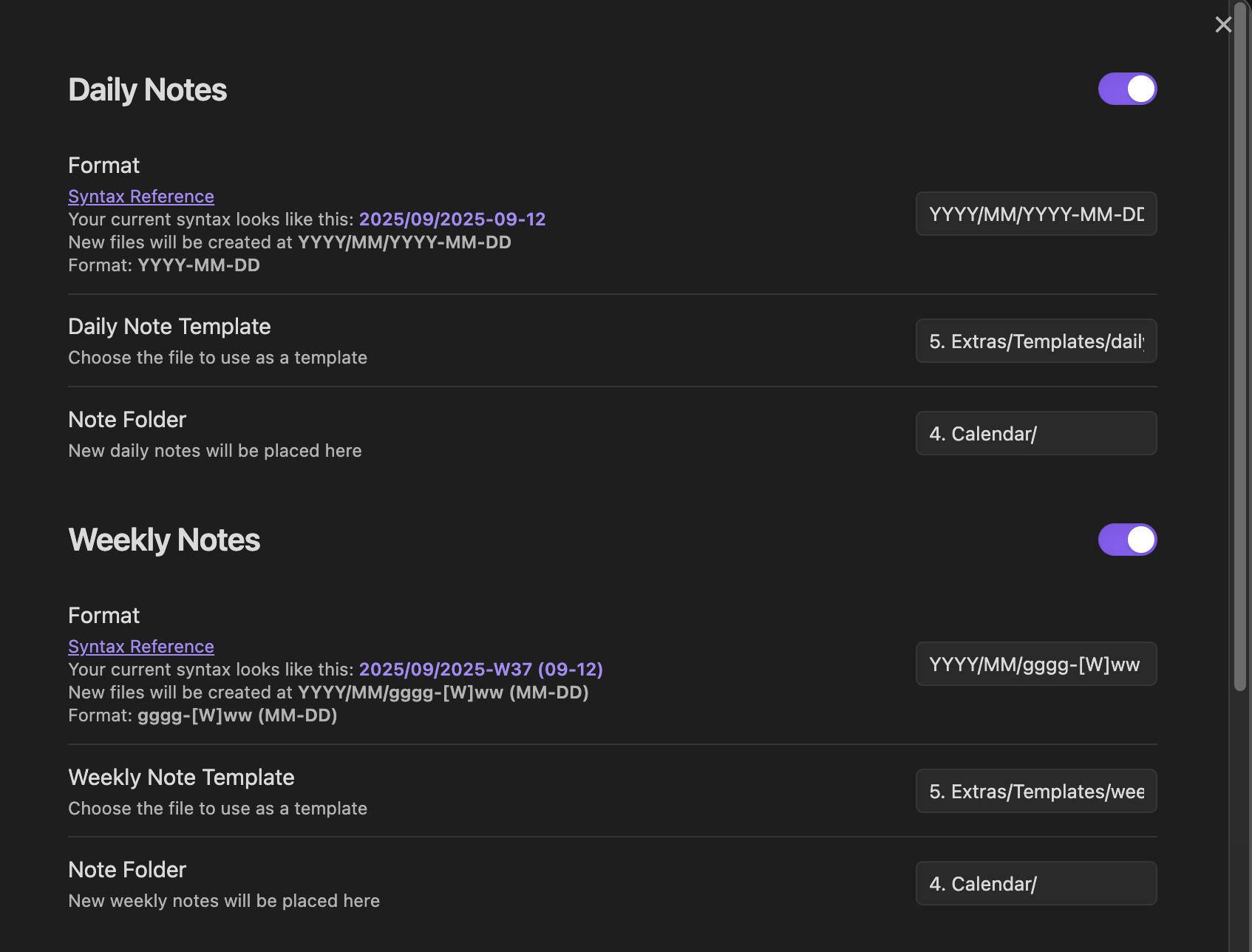
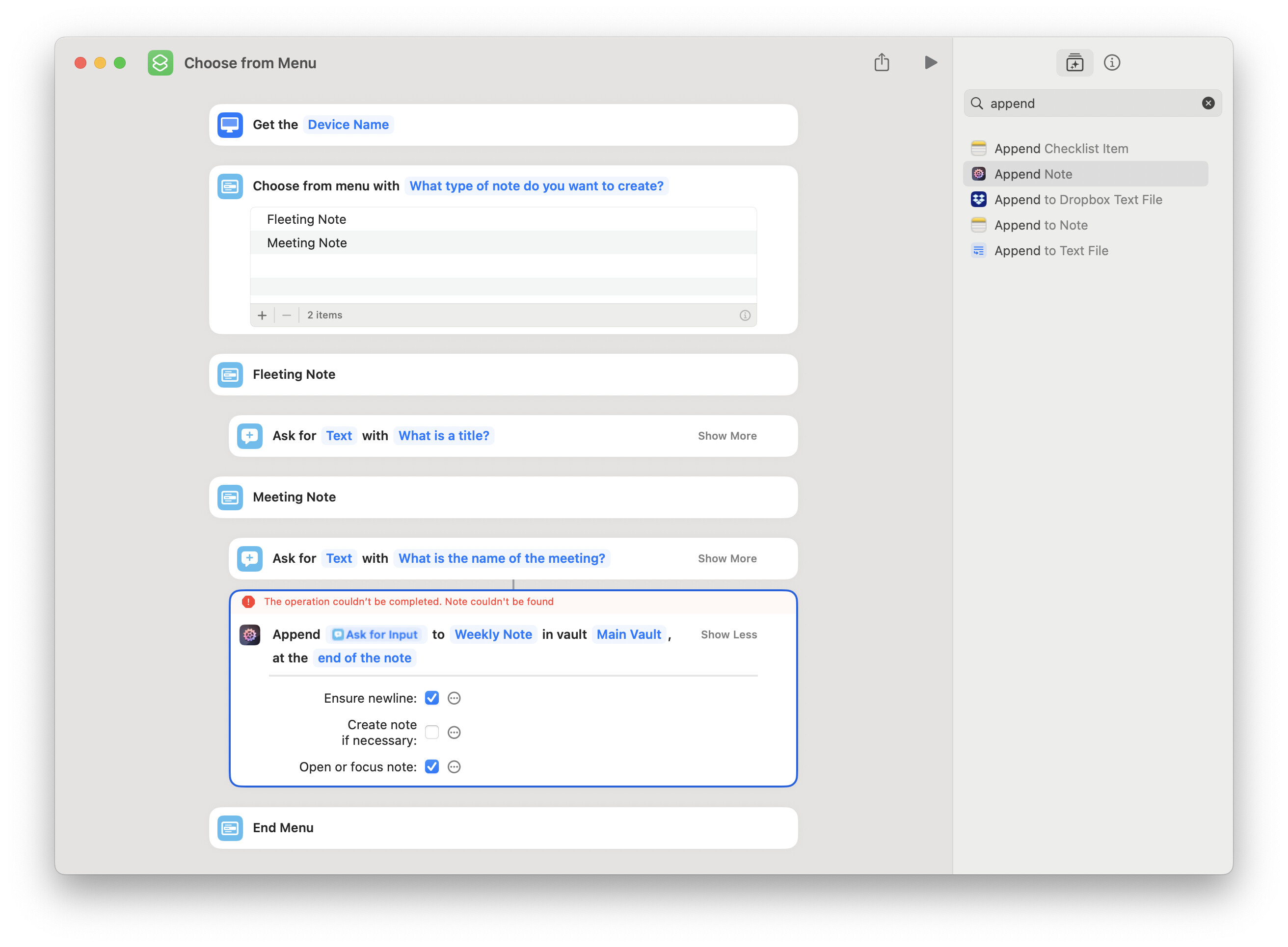
I played around and had a few interesting things happen but without knowing behind the scenes I’m not sure if they’ll be helpful. The shortcut did seem to work with the “Daily Note” option. I tried the “end of note” and “end of section” options but neither worked.
When I tried to switch on the “Create note if necessary” option, the note it created was dated with the current day, 2025-W37 (09-12) instead of the note naming scheme that begins on Mondays (it should be 2025-W37 (09-08), but in other respects it was a weekly note (it applied my weekly note template).
When I tried to switch on the “Create note if necessary” option, the note it created was dated with the current day,
2025-W37 (09-12)instead of the note naming scheme that begins on Mondays (it should be2025-W37 (09-08), but in other respects it was a weekly note (it applied my weekly note template).
I’ve personally seen some weird behavior with weekly notes on Sundays. There was (is?) a bug that sometimes assumes the week starts on Sunday instead of my preference (Monday). So when I accessed the weekly note on Sunday, it’d create a new note for the upcoming week instead of showing the existing note for the current week. I couldn’t tell whether the bug was (is?) in the Periodic Nodes plugin or Obsidian itself.
Could this be related to what you’re seeing? Is the issue you’re experiencing the same on every weekday?
This is perhaps a related issue, but I don’t think so - I’ve also had trouble over time with the calendar plugin settings not loading correctly but added a line to the calendar plugin main.js to override the locale settings after everything else loaded, and I haven’t had that issue lately. (I tried to search for the thread where this was recommended elsewhere, but couldn’t track it down.) Also, the calendar settings do show the week beginning on Monday, and in the sidebar this is displayed correctly - clicking on the week number there correctly loads/creates a weekly note with my template, as does the command Periodic Notes: Open weekly note.
Out of curiosity, I just changed the shortcut to try to open the weekly note and it failed with an error in Obsidian:
[Actions URI] Incoming call failed - 4. Calendar/2025/09/2025-W38 (09-16.md): Note couldn’t be found.
I missed the chance to try yesterday on a Monday to see if the “Append Note” or “Open Note” shortcuts identified the correct weekly note.
However, these errors lead me to think the (MM-DD) syntax in my weekly note title (which is converted to the Monday date) is causing the problems. In fact, when I removed this from the Periodic Note settings (and note title, since it was already created this week), the shortcuts worked correctly. Is there perhaps an issue with the order of operations and syntax handling between the Actions URI plugin and the Periodic Notes plugin?
OH, WAIT A MOMENT. The periodic notes plugin checks if a specific periodic note exists by creating a string with the timestamp specified by the syntax, then looks for a file whose path is that string, and if it doesn’t a note, it’ll create one. So when you add MM-DD for the current date, you’ll get a new weekly note every single day of the week because of that.
Apologies that I didn’t see the MM-DD portion earlier.
Out of curiosity, I just changed the shortcut to try to open the weekly note and it failed with an error in Obsidian:
[Actions URI] Incoming call failed - 4. Calendar/2025/09/2025-W38 (09-16.md): Note couldn’t be found.
Did you explicitly queried for the note with that path, or did you query for the weekly note? Because if it’s the latter, then the formatting of the path (including the botched file extension) is a problem.
Is there perhaps an issue with the order of operations and syntax handling between the Actions URI plugin and the Periodic Notes plugin?
Actions URI doesn’t know anything about the file name of the periodic notes or their syntax. It uses the liamcain/obsidian-periodic-notes npm package to work with the core Daily Notes and community Periodic Notes plugins.
There’s a number of open tickets in that repo about issues with weekly notes; a lot of them seem to be related to locale settings.
I haven’t had this issue with the periodic notes plugin commands actually - it just opens the weekly note created. Sometimes the earlier issues I mentioned, about the week start date, caused issues and would make a new note for a Sunday/Monday start. The settings for periodic notes say:
If you use
DDin the week format, this will refer to first day of the week (Sunday or Monday, depending on your settings).
For the part when I tested opening the weekly note, I queried for the weekly note. I had a typo here about the file extension, sorry. The error should have read [Actions URI] Incoming call failed - 4. Calendar/2025/09/2025-W38 (09-16).md: Note couldn’t be found.
I’m thinking that building the direct path for the note might be a workaround, but it’ll take playing with the date and text options in Shortcuts.
I was just testing things again to make sure I’m not making mistakes when I noticed the ‘Most recent weekly note’ option in the shortcut for Opening notes, and this worked accurately, even when the ‘Current weekly note’ did not.
I stand corrected, then. I didn’t check the Periodic Notes docs before answering, apologies.
I was just testing things again to make sure I’m not making mistakes when I noticed the ‘Most recent weekly note’ option in the shortcut for Opening notes, and this worked accurately, even when the ‘Current weekly note’ did not.
Now that is an interesting data point!
Let me think out loud here… Okay, so the “most recent” is fetched by calling getAllWeeklyNotes() in Liam’s plugin, then returning the most recent one from that list. The “current”, too, is calling getAllWeeklyNotes() but additionally specifying a timestamp for which a note should be returned (Actions URI is passing the current time, there). So both are querying the same data source (good) but one is returning faulty results (bad).
That should give me something to work with. If you could give me the full, raw Weekly Notes format as it’s entered in the Periodic Notes form field, please, that should help in recreating the exact file paths (and hopefully, the problems).
I’ll take a look. Might take a few days, tho, as I’m having my hands full with some necessary, substantial AFO rewrites at the moment.
Thanks for troubleshooting. The weekly note syntax is: YYYY/MM/gggg-[W]ww (MM-DD). It is nested in a folder also indicated in the periodic notes settings: 4. Calendar/.
If there is other information I can provide let me know.
I was able to get a shortcut to work with my workaround, specifying the direct path. There might be a way to simplify it in shortcuts, but I formatted the date and then used the Append Note action as follows:
Prepare date:
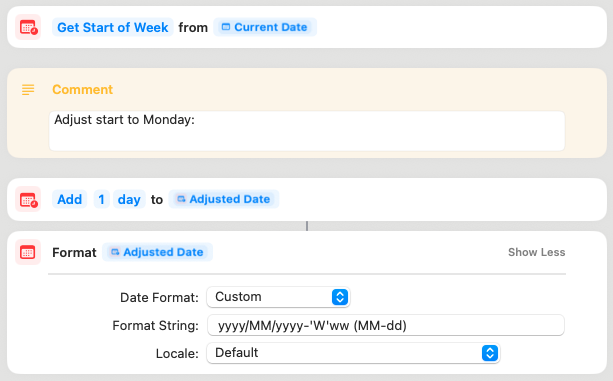
Notes: Grabs the start of week, adds a day to begin on Monday, formats date.
Append note:
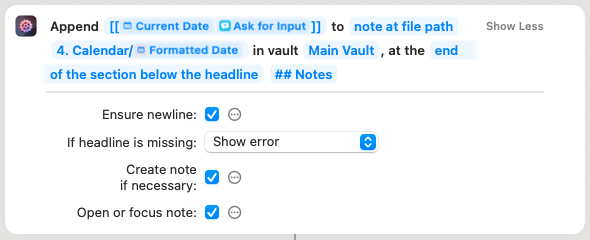
Notes: I added the calendar folder at the path here, but could have put it earlier.
Getting somewhere! It appears that the syntax MM-DD works differently in the Periodic Notes plugin and the aforementioned package that Actions URI is using to resolve the periodic notes. In the Periodic Note plugin, it means “first day of the week (Sunday or Monday, depending on your settings)”.
In the the liamcain/obsidian-daily-notes-interface npm package (again: same author as Periodic Notes itself!) the format is parsed in the “correct” way, i.e. the same way it works anywhere in Obsidian and everywhere else: DD is the current day of the month.
That means the “current weekly note” request in AFO worked well for me yesterday (a Monday, i.e. start of the week), and both Periodic Notes and the developer-focussed obsidian-daily-notes-interface resolved YYYY/MM/gggg-[W]ww (MM-DD)[1] to 2025/10/2025-W41 (10-06).md. But today it’s broken again, since Periodic Notes still returns the same computed path as yesterday while obsidian-daily-notes-interface resolves it to 2025/10/2025-W41 (10-07).md.
Well, at least we have found the culprit.
Looks like I’ll have to fork obsidian-daily-notes-interface and fix it myself, as it’s pretty much abandoned at this point, don’t I. BIG SIGH.
I’ll put it on my todo list, and I’ll try to get it fixed next week.
UPDATE, 5 mins later: That was only part of the problem, it seems. Even after stripping down the syntax so there’s no DD anymore I see the same issues remain.  Might be a caching problem, tho, as it didn’t appear again when I reopened the vault.
I was able to get a shortcut to work with my workaround, specifying the direct path. There might be a way to simplify it in shortcuts, but I formatted the date and then used the Append Note action
Good job! If you use that bit in several places, you could make it its own workflow that returns the path as a text, and call it like a subroutine from your main workflow(s).
BTW: Why
gggg? It’s the same asYYYYfor most people, I guess, and you already useYYYY– I wouldn’t mix and match. ↩︎