Hi all,
as I’m tackling on a bit of a end-of-year project, I wanted to see if anyone could give me a pointer.
The idea is relatively simple: For Obsidian to function as a basic CRM.
To do this, I have utilised two scrips @czottmann has shared here and adapted for my needs:
-
Contact to Note
- I have added more information (first name, middle name, last name, birthday, phone numbers, email addresses, address, coordinates)
- I include all this information into the note properties: Makes it nice to query via Obsidian bases and display is easy via “=this.first-name”
-
Email to Note
- I let this run if a person is part of the group specified above – This way, I know that I have their email address
- I get the sender, to recipient, cc recipient email addresses
So far so good: I get my contacts into Obsidian and I see my emails.
Now for the next step – Linking the contact note in the email. I want to create this link both to be able to quickly navigate to the sender note but more importantly, I want to ensure that I can display all emails from and to a person in their contact note.
Basically, I want to check the email addresses in the email (e.g. the sender if it is an email I received) against the contacts and link them.
So it would work like this:
- Receive email e.g. from john@doe.com
- Check my contact notes for the john@doe.com email address, finding that I have an ‘John Doe’ note
- Replace/Add in front so it looks like ‘[[John Doe]] (john@doe.com)’
Looking into solutions, I see suggestions that say to create a list of email addresses and the contact note that they should resolve in. And then letting the email addresses run over them and replace them.
But I’m a bit stuck on how to integrate that into a shortcut and also wondering if this is something I do during every import or as a separate thing?
As I said, would be really glad for any pointer to close the loop – Thank you and wishing everyone a wonderful holiday period!
To follow up on this with something interesting:
We can display the address from the contact in a map in Obsidian.
What enables this, is the (new) bases plugin which features map view.
Here is how:
- Get the address from contact and save in a variable (e.g. ‘full address’)
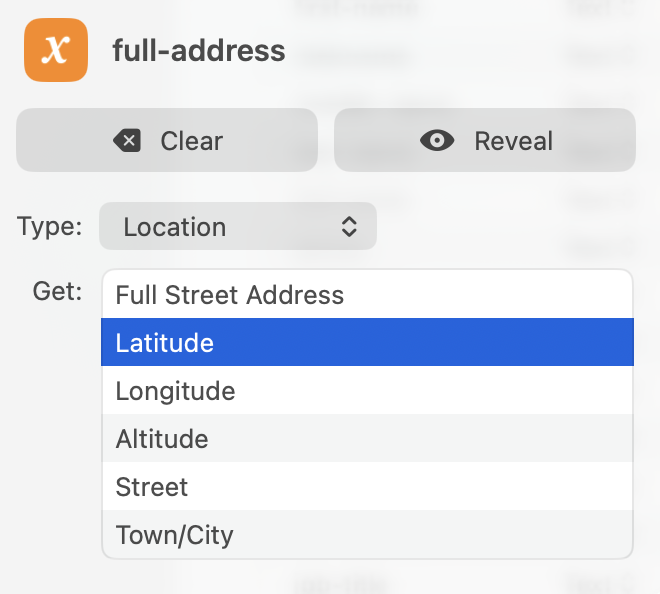
- Then, from that variable, get longitude and latitude:
- Last step is to save both (first latitude and then longitude) into a property which you can then reference in the bases
Hope that helps someone else out there!
Interesting stuff so far, @LikeShootingStars! I didn’t get around to looking into this before the holidays, and I really need a couple of days off. I’ll try to contribute soon™!
Thanks @czottmann, I fully understand – Wishing you a nice holiday und einen guten Rutsch.
When you are back, looking forward to your response!
I’m back! Okay, so the issue you’re struggling with is the mapping/lookup from “incoming email sender” → contact note, do I understand this correctly?
Welcome back @czottmann – Hope you enjoyed your well-deserved break and had a good start into 2026!
Now onto the issue:
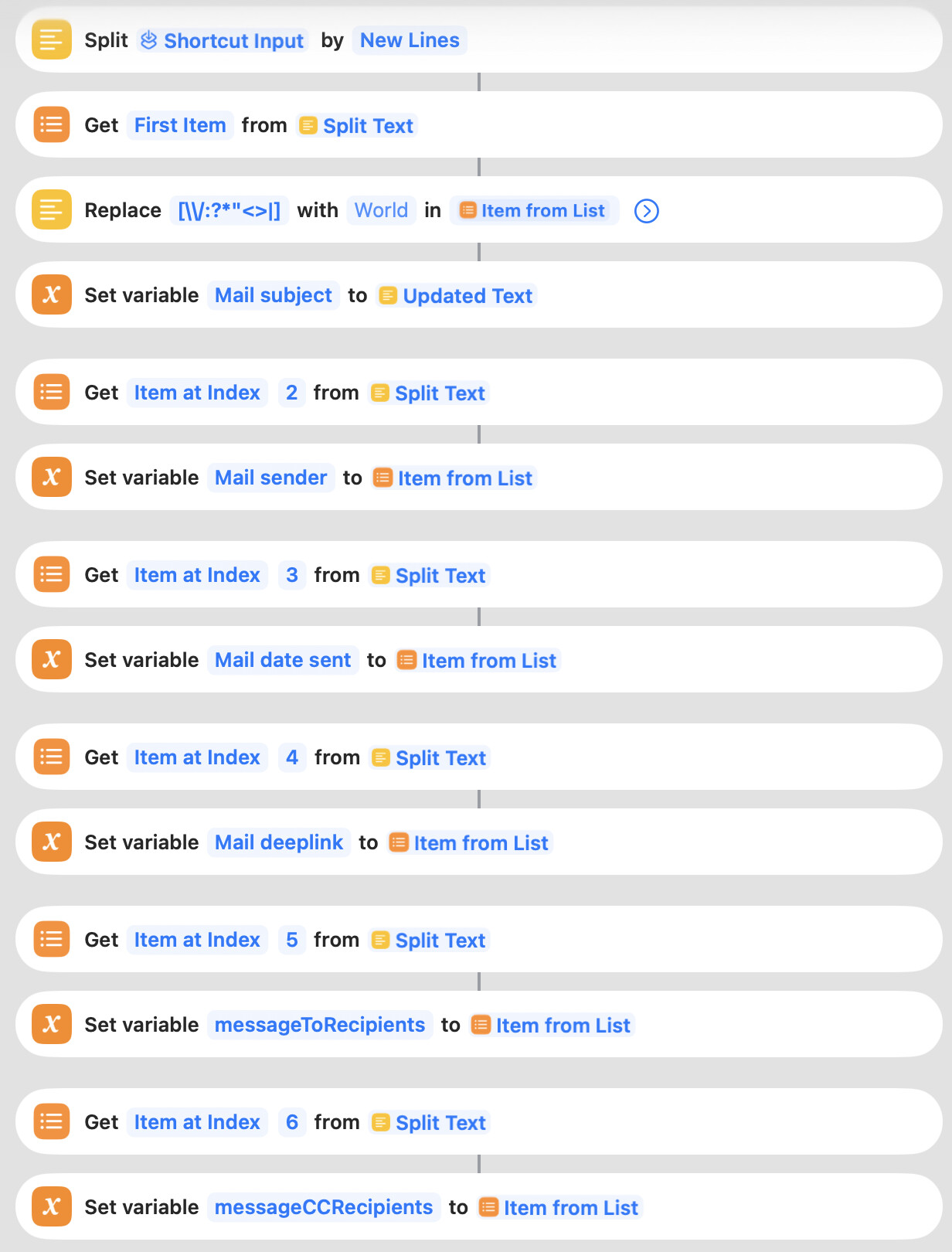
I have expanded your original Email to Note script a bit to include “sender”, “to-recipient”, and “cc-recipient".
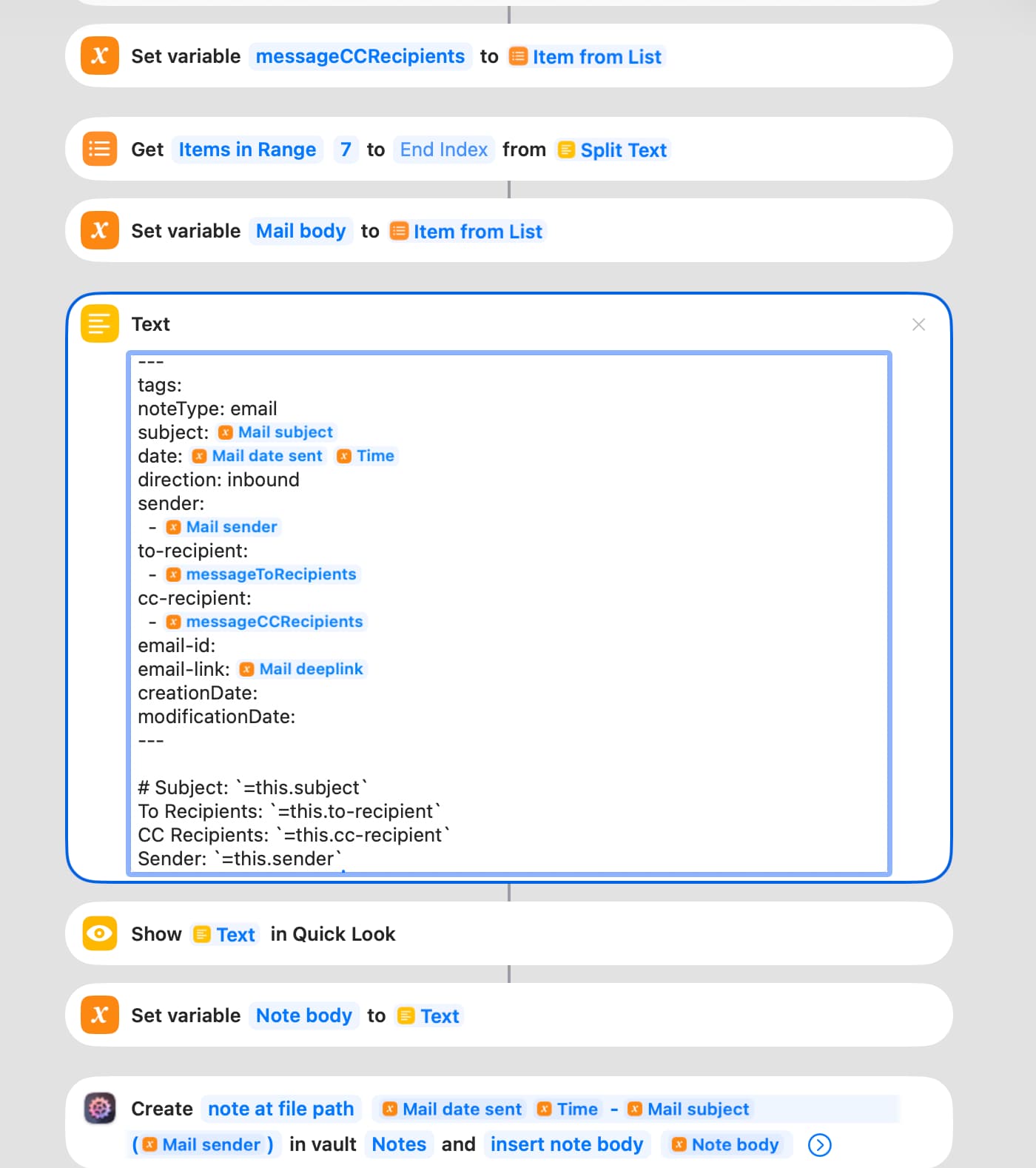
This is then picked up in Shortcuts and the most of the meta information filled into the note properties:
These properties are the referenced in the note body to have a clean display while being able to query the meta data easily.
My question is then the following: How can I replace an email address (be it sender, to recipients, or cc recipients) with a link to a person’s note.
The desired behaviour is for the email address to be replaced with a link to a note followed by the email address e.g. john@doe.com becomes “[[John Doe]] (john@doe.com)”. And the fallback for people, I don’t have a contact note for, to simply stay the email address.
Looking into it, it seems that a solution would be to create a table from my contact notes mapping names against email addresses:
- Check all contact notes
- Create table of name and email address, e.g. John Doe – john@doe.com, John Doe – john.doe@doe.com
- Replace email address from email received with composite of link to note and email
But I’m a bit stuck on how to do this and how to include it into this shortcut.
So any help would be appreciated!
(FYI, I had tried to put the Appel Script code in here but got an 403 error)
How can I replace an email address (be it sender, to recipients, or cc recipients) with a link to a person’s note.
I thought about using aliases in the contact’s note (i.e., the related email addresses) but that doesn’t work since the aliases are only cosmetics when typing out a wiki-style link. Hmm.
The desired behaviour is for the email address to be replaced with a link to a note followed by the email address e.g. john@doe.com becomes “[[John Doe]] (john@doe.com)”. And the fallback for people, I don’t have a contact note for, to simply stay the email address.
Do you want that to happen in the note body so that it’s visible in preview? Because that might be doable dynamically, using Dataview (as in: “find note w/ email address, then output a link to that”). “Hardcoding” the link in the note itself (body or front matter) will be way more involved because you’d have to rewrite the note at creation/modification, but you know that 
But since we’re already talking about Dataview (well, I am), if Dataview is an option for you,then there’s the Get Dataview List action. When you gather all your variables, before you compile the final note body, you could add a DV query in the mix to fetch the right contact note. Assuming the contact note contains email addresses like this:
---
emailAddresses:
  - "carlo@zottmann.dev"
  - "carlo@zottmann.org"
---
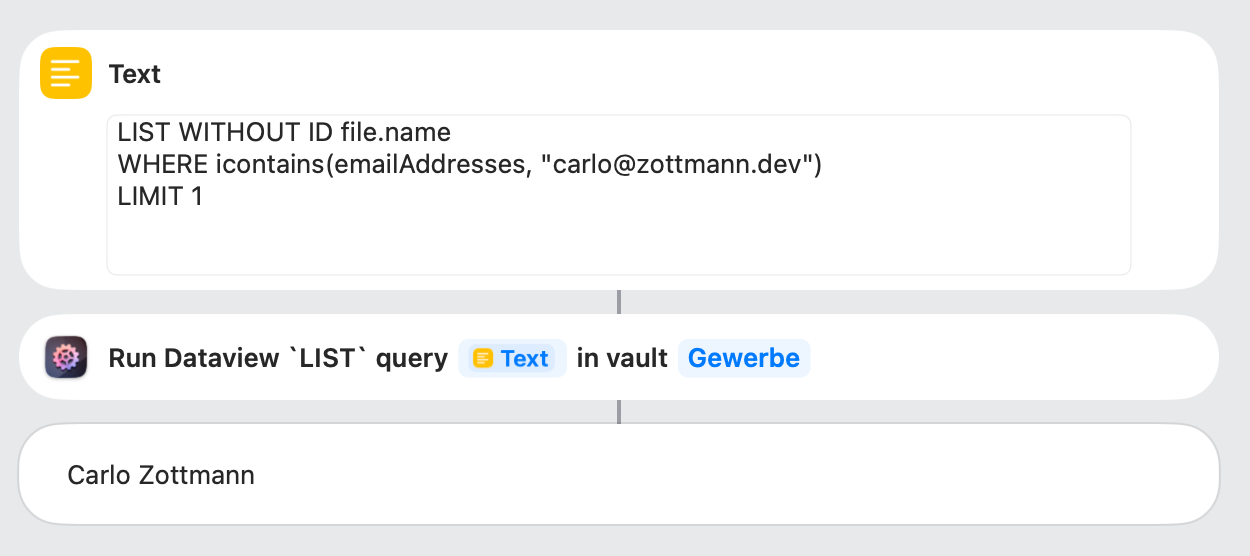
… then this DV LIST query:
LIST WITHOUT ID file.name
WHERE icontains(emailAddresses, "carlo@zottmann.dev")
LIMIT 1
… would return that note’s title (= contact name). Set it up like this:
Save the output of the Dataview action in a variable, if the var’s empty afterwards, there’s no related contact.
Does that help?
Hi @czottmann thank you for getting back on this and sharing about the Dataview route!
I’m not sure if Dataview is the right solution, allow me to provide a bit of context:
Ultimately, I want to see in the contacts’ note their emails – This is what makes it a CRM for me, being able to go back and forth between contacts and the interaction with them.
Ideally, I’d use an Obsidian base of this like this (to make it reusable/templateable):
filters:
  and:
    - noteType == "email"
    - or:
        - cc-recipient == this.file
        - to-recipient == this.file
If I understand sufficiently the workings of Dataview, it might show me the right information but will not make the Obsidian links that my setup required. Or would the then this DV LIST query provide me with the file.name that I could include then? And would it also work for multiple email addresses, e.g.
---
to-recipient:
  - jane@example.com
  - john@doe.com
cc-recipient:
  - jane@example.org
  - john@doe.org
---
Or would the then this DV LIST query provide me with the file.name that I could include then?
The action shown in my last post would return the name of the note, i.e. the name of the contact, which you might then use to create a wiki link in your new note body. So the new note would contain a link back to the sender’s contact note. I guess this line:
Sender: `=this.sender`
… would then become:
Sender: [[<Sender name>]] (<Mail sender>)
(The <…> are the variables you set earlier.)
That said: Dataview can also return a composed string, e.g. "[[<Sender name>]] (<Mail sender>)". Change the DV query to this:
LIST WITHOUT ID "[[" + file.name + "]] (" + firstvalue(emailAddresses) + ")"
WHERE icontains(emailAddresses, "carlo@zottmann.dev")
Compared to the initial DV query, this does more: It finds the note that contains the passed-in email address, and returns the name as a link followed by the first email address from that note in parentheses. Also, the “LIMIT 1” is removed so it’ll return a list of those strings (instead of just one) – good for your “to:” and “cc:” lists.
So that could work. The only thing I see that might be an issue is that you’d either have to run that action for every single email address in that incoming mail or you’d run it once for every header type (“to:”, “from:”, “cc:”) but for that to work you’d have to get creative in the DV query because it’s “WHERE” clause only checks for one address right now.