New beta build is out, grab it from the Listening Post product page!


Dear testers,
This is the last big beta before Listening Post’s release.
Beta 12 is built around one substantial pivot and one big quality-of-life upgrade, plus a global hotkey, a smarter launch behavior, and a much needed “Is this channel actually working?” UI.
New & Exciting
iCloud Shazam Library support. LP can now read your iPhone’s, iPad’s, and Apple Watch’s recognized music — anything you’ve shazamed on those devices arrives in LP via iCloud sync, and from there flows into your scrobblers (Last.fm, ListenBrainz, Maloja, Rocksky) like any locally-recognized track. The import feature in the History window pulls in your existing Shazam library in one shot, and a continuous-mirror mode keeps it in sync going forward. Both are off by default; toggle them in Settings → Shazam Imports. In other words, this is an opt-in feature.
Note: imported tracks don’t get sent to now-playing channels like Bluesky or Mastodon, because their timestamps are historical and you probably don’t want last Tuesday’s vinyl session showing up on your timeline as “now playing.”
This effectively turns your Mac into the scrobbling hub for your whole Apple world — no need to fiddle with separate iOS scrobblers, no homelab full of Docker containers and whatnot.
History window. A dedicated browse window with a filter sidebar (full-text search, time windows, “not scrobbled to” multi-select, “imported only”), sortable columns, and a per-listen inspector that lets you scrobble or post on demand, jump to each channel’s track page, or delete listens. Opens with ⌘Y or from the menu bar.
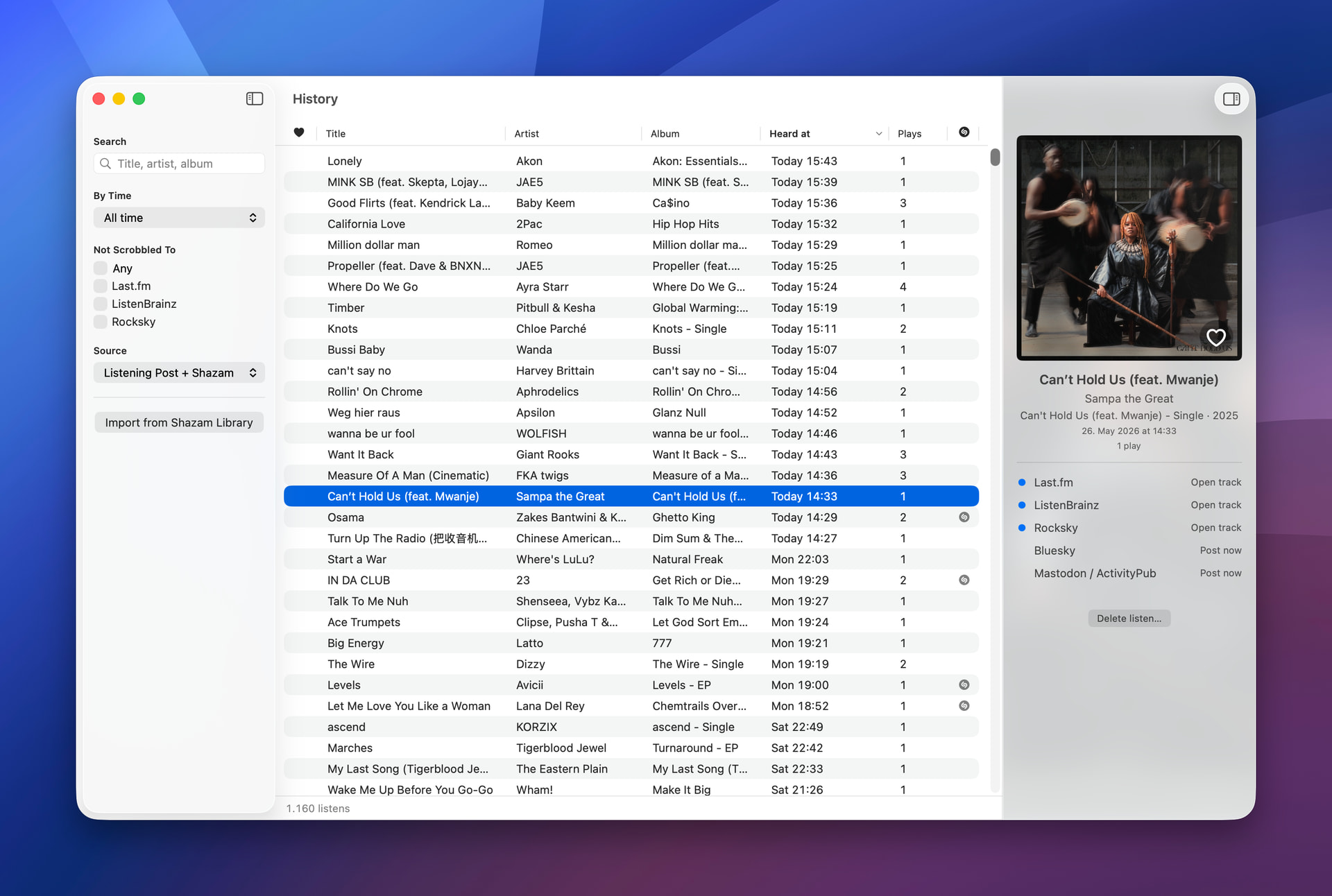
Listening Post launches into History. Starting the app now opens the History window by default. Configurable in Settings if you’d rather it didn’t.
Recognize Now hotkey. A global keyboard shortcut for ad-hoc music recognition without leaving whatever you’re doing. Configure the shortcut in Settings; trigger it from anywhere and the menu bar flashes the matched title back at you. Also available as a menu bar entry.
Channel health made more visible. When a channel hits a terminal publishing failure (bad credentials, dead server, rate limits gone sideways), LP now actually tells you about it. The menu bar icon shows a little alert icon, broken channels get an indicator in the sidebar, and a health banner explains what’s wrong on each channel’s config view with a Verify button that re-checks and drains the outbox on success.
No Longer Broken
- Rocksky — Transient 401 errors from Rocksky (server issues etc.) were causing LP to wipe the channel’s stored API key, forcing a re-entry. Credentials now survive transient auth blips.
- Phantom “unlicensed” warnings — Sometimes the app would forget it was still in beta, flashing up a “Please license” dialog, usually after a network blip during activation. The license check is now far more careful about what counts as “definitely not licensed” versus “couldn’t reach the server right now.” Thanks for the patience and the reports!
- ListenBrainz rate-limit data loss — During bulk imports or busy scrobbling, LP wasn’t honoring ListenBrainz’s rate-limit headers, which could cause listens to be silently dropped. Rate limits are now respected and deferred work retries correctly.
- A few issues in the track metadata enrichment pipeline.
- Channels window no longer goes blank — When any channel reported a publishing issue, the main window could go entirely white. Won’t anymore.
Changes
- Re-ordered the menu bar entries and main menu entries.
- Welcome window redesign — The onboarding screen now features the History window prominently without getting any wider.
With Beta 12, Listening Post graduates from “Mac mic scrobbler” to multi-device scrobbling hub for your whole Apple world. The Mac stays the brain; the iPhone, iPad, and Apple Watch become recognition sources via iCloud; and everything you identify, on whichever device, ends up in your scrobblers, your files, your social posts, your Shortcuts.
This is the last (big) beta before 1.0. Test it, break it, tell me what’s busted, what’s confusing, what you wish worked differently.
Download Beta 12 · Landing page · Documentation
Thanks for testing, all,
— Carlo