👉🏼 Listening Post: Start here!

Listening Post is the music tracking app I always wanted.

TL;DR: Download the beta, have fun.

For years, I’ve used Shazam and Last.fm to keep track of the bangers around me, but checking my Last.fm profile, you’d be forgiven to think that all I ever listen to is upbeat DJ sets – because the recognition apps work with Apple Music or Spotify pretty exclusively, which means they only track what I listen to on Apple Music — which happens to be mostly upbeat DJ sets while working.[1]

But that’s not the whole picture! Music is all around us. For example, during the day, I often have the radio set to FM4 or ego.fm in the background. Or I’m at my favorite coffee shop, working on my Macbook — there’s music, too! But it’s not on Apple Music, and so it “doesn’t count”.

So I built Listening Post: a macOS 15.6+ menubar app that keeps an open ear to the music around me.
Before we go any further, though – and feel free to skip this chapter! – …

Why?

In addition to what I just explained, in short: Data sovereignty.

I hate lock-in. As nice as Last.fm is, it shouldn’t be my source of truth! Over the years, I’ve been burned more than once by services that held all my data, then jacked up the prices, or decided I’m not their target demo anymore. (Fair game, but I don’t have to like it.)

And yes, I want to share my music listening when I feel like it. Using a scrobbling service like Last.fm is fine but I want to share to it, not fully rely on it. And that only works if my data is truly my own. Therefore, Listening Post keeps that data on my machine, and happily exports to local files as it goes along, in formats I can work with (CSV, JSONL).

Sure, I could get all my data out of Last.fm (or whatever site you might be using) by ways of their API but that API might go away overnight. That’s not a cheerful thought, is it.

Also, I kind of loathe the relay-my-own-data-back-to-me way of working with Last.fm et al. I create something (e.g., a listen), that goes into Last.fm, and when I want to use it, I have to exfiltrate it back out. That’s backwards.

On a related note: I like ListenBrainz for its non-commercial, “public good” ethos. I want to support that by adding a good native macOS app to the mix.

I could go on :wink: but let’s continue.

How does the music recognition work?

Listening Post hears what you hear. Every minute, it quickly uses the microphone to checks if for playing music; when it detects a song (using Apple’s ShazamKit), it’ll verify the recognition a few seconds later. If its successful in that, the recognized track is saved to its internal database.

:light_bulb: No audio leaves your Mac! Only a tiny “digital fingerprint” is created, which can’t ever be reversed into audio. It’s entirely safe to keep this app running. To verify this claim, feel free to check LP’s network traffic.

Then, it continues to …

Enriching recognized tracks

Track enrichment is the process of adding extra metadata to a song after Shazam identifies it. When Listening Post recognizes a track, Shazam provides basic information like artist, title, and Apple Music details. Enrichment fills in the gaps by querying external services for additional identifiers and links that Shazam doesn’t provide — things like MusicBrainz recording IDs, service-specific URLs (like Last.fm’s track link), and release year.

The app uses three enrichment sources: ListenBrainz provides MusicBrainz recording IDs (which are more reliable than other sources), Last.fm provides direct links to the track’s Last.fm page, and Deezer provides the release year by looking up the track’s ISRC code. Each source is only queried when its corresponding channel is enabled and configured. For example, if you haven’t set up Last.fm, the app won’t bother asking Last.fm for data.

Enrichment happens asynchronously in the background after a track is recognized, once per unique track (not per recognition!), so repeat plays of the same song don’t trigger redundant lookups. If an enrichment request fails, the system retries a few times before giving up.

Once a track is enriched and good to go, it’s added to an outbox queue, waiting for the end of the so-called …

Publication delay

When a track is recognized, it gets added to a queue for each enabled channel. The app waits for the configured publish delay (default: 5 mins) before sending tracks to any channel — this gives you time to skip false positives (or tell the app to forget particularly awful songs) before they’re recorded anywhere. If publishing fails for a particular channel, the track stays in the queue for retry.

After the delay, the track is sent to Listening Post’s …

Channels

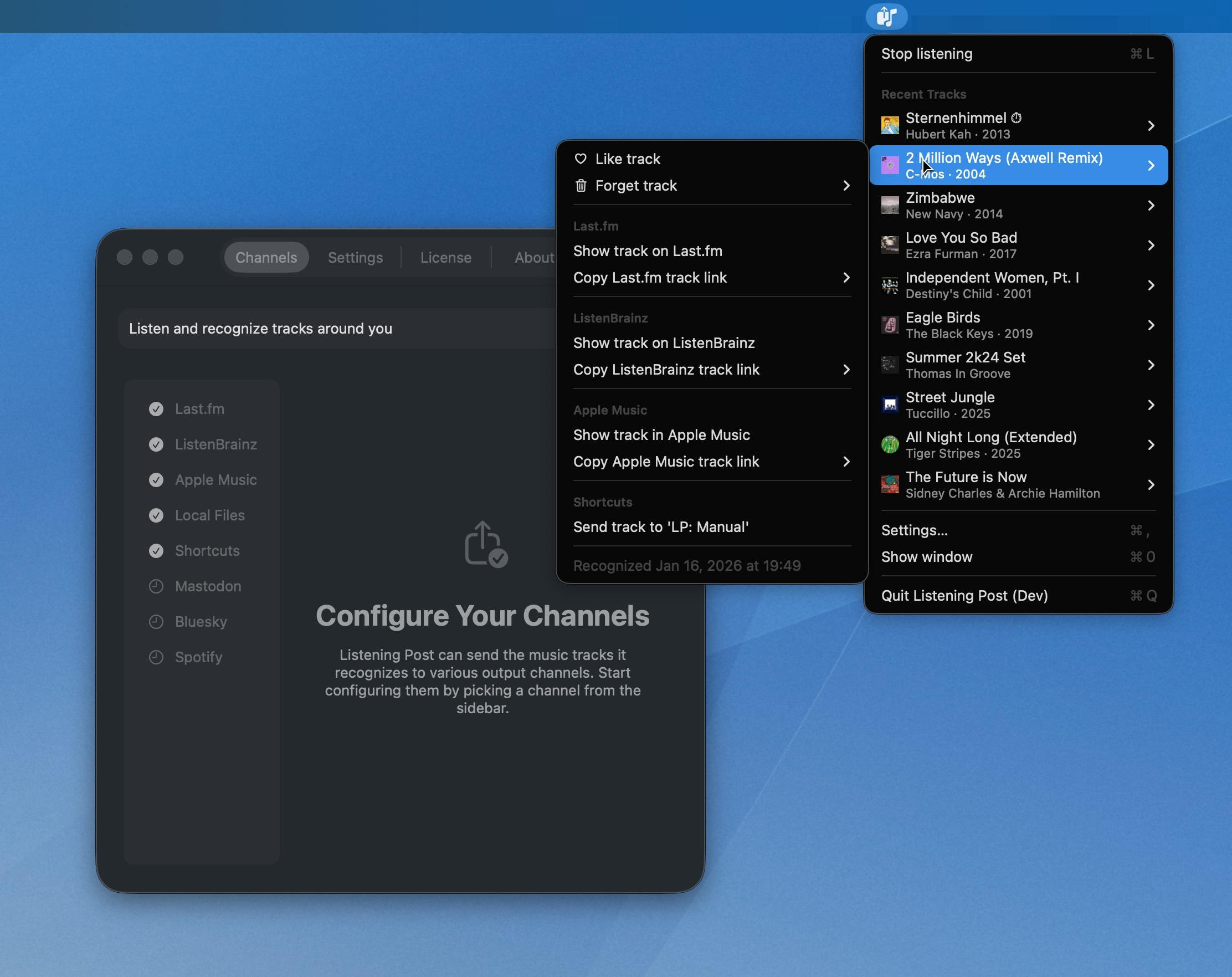
Channels are output destinations where Listening Post sends recognized tracks (you could say it “posts … your listens”!).[2]

The app currently supports five channels: Last.fm and ListenBrainz for scrobbling, Apple Music for adding tracks to your library, Files for exporting local files, and Shortcuts for running local automations. Each channel can be independently enabled or disabled, and some require configuration (like API credentials) before they work.

But channels are not only for automation, they also add functionality to the menu, in the form of …

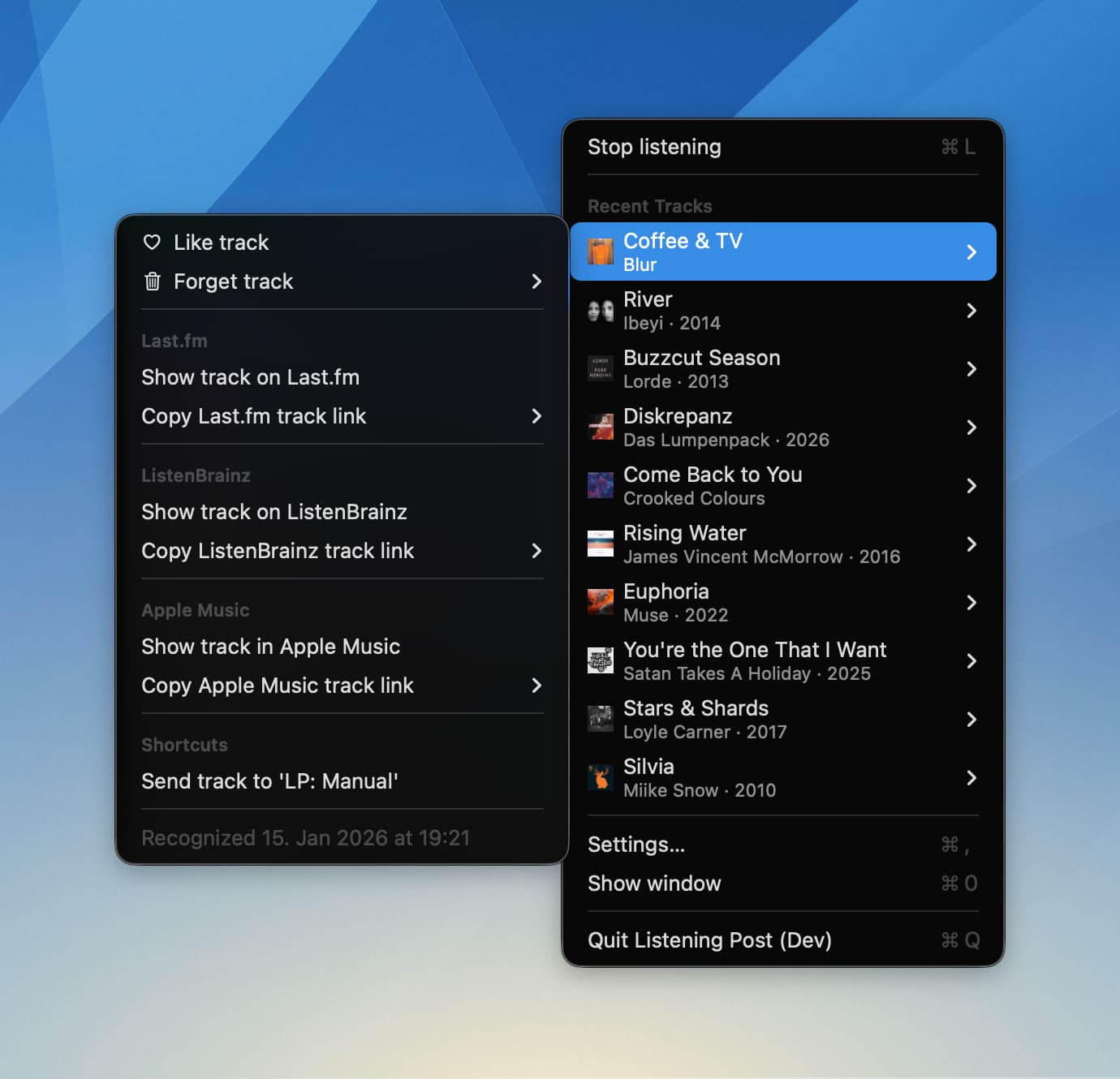
Track actions

Global actions are actions like Like/Unlike and Forget track. When you like a track, and have remote channels enabled (Last.fm and/or ListenBrainz), then this info will be relayed to those channels, meaning your like will propagate to Last.fm or ListenBrainz.

Then there are so-called channel track actions which only become available when a channel is enabled, and is properly configured, and the track is fully recognized and enriched.

For example, once you’ve enabled the Last.fm channel, and have authenticated the app there, and the track is ready to go, then the channel’s track actions will let you open the track on the site, let you copy the track’s link to your clipboard:

And that’s the gist of it.


Welcome to the beta!

It’s very, very early days, so expect a couple of rough edges. The feature set isn’t nearly complete, either. I’ve been working on it for the last three weeks, so it’s just a minimally viable product at this point.

Still: I’d be delighted if you would Listening Post a good spin, and if you like it, give me some feedback. There are “Contact the author” links in the app for sending a mail, or post here in the LP forum. I read everything!

Download the beta

And if you’re now curious and want to learn more, here are some more in-depth posts. (A proper documentation site will comes soon.)

The channels, explained


  1. There’s standalone “recognize and send to Last.fm” apps for iOS and macOS, but I’m usually too slow to get them going when something’s good is on, that’s on me. ↩︎

  2. See what I did there? I am very excited about this wordplay. :clown_face: ↩︎

1 Like

Thank you for making this app! I saw a post about it in the ListenBrainz subreddit.

Sometime in the past year I created a scrobbling workflow using Keyboard Maestro because there wasn’t any other solution out there that met my needs. Scrobbling to Last.fm was no problem, but I couldn’t find a readymade macOS solution for scrobbling to ListenBrainz.

I have that system in place, and it’s working great, but LIstening Post has the potential to fill another need: scrobbling tracks from radio streams, which don’t generally have metadata. I’ve been testing out Listening Post just now and it seems to be doing the trick, at least for any tracks which are recognized by Shazam.

A few feature requests:

  • Support for Multi-Scrobbler. My scrobbling setup involves sending scrobbles to a self-hosted Multi-Scrobbler instance, which then distributes them to Last.fm, ListenBrainz and a self-hosted instance of Koito. Would you consider adding Multi-Scrobbler as a channel? MS offers two endpoints, one in a Last.fm format and the other in a ListenBrainz format. I believe the API submission is identical to what would be sent to either of those, the LP user would just need the ability to enter a custom URL for the submission. (I’d be glad to offer advice on setting this up.)
  • Manually submitting scrobbles. It would be nice to be able to keep publishing turned off and then manually submit all recent scrobbles whenever the user feels confident they’ve removed any unwanted tracks, etc.
  • Manual entry of tracks Shazam doesn’t recognize. This may be outside of the scope of what you’d like to offer, but it would be great if the user was shown a pop-up notification when Shazam doesn’t recognize a track, and the user is given the opportunity to enter an artist, title and (optional) MusicBrainzID.

These are just some ideas that I wanted to share while they’re fresh on my mind. Excited to see the app’s progress!

Good morning, @jacksaturn, and welcome to the forum.

I think you’re the first person talking about LP and using the word “need” in that context, I like it. :wink:

Support for Multi-Scrobbler. My scrobbling setup involves sending scrobbles to a self-hosted Multi-Scrobbler instance, which then distributes them to Last.fm, ListenBrainz and a self-hosted instance of Koito. Would you consider adding Multi-Scrobbler as a channel? MS offers two endpoints, one in a Last.fm format and the other in a ListenBrainz format. I believe the API submission is identical to what would be sent to either of those, the LP user would just need the ability to enter a custom URL for the submission. (I’d be glad to offer advice on setting this up.)

Tell me more, and I’ll look into it. Infos on API endpoints, auth, etc. would be welcome.

Manual entry of tracks Shazam doesn’t recognize. This may be outside of the scope of what you’d like to offer, but it would be great if the user was shown a pop-up notification when Shazam doesn’t recognize a track, and the user is given the opportunity to enter an artist, title and (optional) MusicBrainzID.

Well, that’s kind of a real problem. So, most scrobble tools get clear outside signals: e.g., Apple Music/ Spotify/ etc. sending a systems notification that a new track has started, so the scrobbler knows that music is playing. Listening Post just assumes music is on, and unconditionally and periodically tries to fingerprint the sounds it hears. And that either works or doesn’t.

But there’s no info whether the sound it fingerprints is actually music. So it’s kind of impossible to differentiate whether it failed because there wasn’t music playing or because it didn’t recognize that actual piece of music. Sending out a fingerprint to another service for recognition just to “get a 2nd opinion” looks like a surefire way to ruin me financially. :sweat_smile:

I’m open to suggestions, though.

Manually submitting scrobbles. It would be nice to be able to keep publishing turned off and then manually submit all recent scrobbles whenever the user feels confident they’ve removed any unwanted tracks, etc.

It’s on my “Maybe” list, so yes, I think about it already, but not too hard at the moment. :wink:

Thanks for your input, keep it coming!

1 Like

After I posted my original message, I actually came to the same realization regarding unrecognized songs — there’s no way for Shazam to know whether a new song has started playing, or if it’s even a song! So I can see how that really couldn’t be configured to work automatically.

A decent amount of music I listen to is semi-obscure or recently released, sometimes by artists who haven’t submitted their tracks to Shazam (or even to streaming services). I’m often adding these releases to MusicBrainz as I’m listening.

So in the case of listening to a radio stream, I’m finding that maybe the first and the third track are recognized, but the second one in between isn’t. What I’d like to figure out is an approach where I can do that second scrobble manually in between, then even if ListenBrainz doesn’t recognize it, I can go in later and add the data to MusicBrainz and add artwork for Last.fm.

[ some text redacted ]

I had posted some further suggestions here, but then I was thinking about it a few hours later and realized that Listening Post already does what I need:

By leaving “Local” turned on and disabling the ListenBrainz / Last.fm channels, I’ll have the CSV/JSON files to work with at my leisure. I’m going to see about coding a script to bulk upload the queue once I have it ready, and I’ll share the finished code here in case it’s useful for any future functionality. :+1:

This is a modified version of the code I use to submit scrobbles to Multi-Scrobbler in the ListenBrainz format:

curl --retry 12 --retry-all-errors -X POST \
	-H 'Authorization: Token TOKEN' \
	-H 'Content-Type: application/json' \
	-d '{
    "listen_type": "single",
    "payload": [
    	{
            "track_metadata": {
                "additional_info": {
                    "submission_client": "Listening Post",
                    "submission_client_version": "2026.0.3",
                    "duration": "DURATION",
                    
                },
                "artist_name": "ARTIST NAME",
                "track_name": "SONG TITLE",
                "release_name": "ALBUM TITLE"
            }
        }
    ]
}" http://SUBMISSION_URL:9078/1/submit-listens

The fields that need to be replaced here are TOKEN, ARTIST NAME, TRACK NAME, RELEASE NAME and SUBMISSION URL. The submission_client_version field would also need to dynamically update with new versions of Listening Post.

I’ve also left the “duration” field there in case Shazam provides this info, but that could be removed if not. (If it does, I’d encourage you to add that to all scrobbles — the vast majority of my ListenBrainz listens have the track duration listed next to them, but I just did a test and a track scrobbled through Listening Post does not.)

You can add any mbid info that is provided when Listening Post looks up the song.

This is where I originally got my reference: JSON Documentation — ListenBrainz 0.1.0 documentation

The code above is exactly what is used if I were submitting to ListenBrainz, and Multi-Scrobbler is able to receive and understand it. MS takes my submission, reformats it for Last.fm and sends it there, so I’m not totally sure what Last.fm’s expected formatting looks like. But I assume it’s a similar situation, the code would be the same as Listening Post’s current Last.fm submission method, only the TOKEN and SUBMISSION URL would need to be different.

Also, if you wanted to add a separate submission channel for users who want to scrobble directly to Koito, I believe it would use the same ListenBrainz-formatted submission as above, and just the submission URL would be changed. See here under “Setting up the Scrobbler”: Setting up the Scrobber | Koito

You may not be using a curl / POST method for submitting all this, but I assume this gives you enough basis to modify the metadata into your existing code. Let me know if there’s anything else I can clarify!

1 Like

Thanks, appreciate it! And I also came to the same conclusion—except that it made me think that I want to add Shortcuts actions for selectively scrobbling to any of the supported services. So the customer could whittle down the CSV/JSON export, then hand it over to a Shortcuts workflow which would scrobble it. So that’s on my todo list now. :wink:

Noted. I’ll see what I can do.

That’s good info, thank you! I’ll likely add a “LB-compatible scrobbler” channel with input fields for name, token, and base URL (from which the submission URL would be derived). That should cover all the bases, I think.

1 Like

I think this sounds like a great idea! I created a system to do this using Keyboard Maestro in a ListenBrainz submission format — I’ll see if I can translate it to Shortcuts and post it here in case it may be helpful.

With a few days to experiment, I have some new perspectives, and for my own purposes I see that I was over-complicating things.

My previous plan was to turn off real-time scrobbling, play the radio feed, then go back afterward and create new lines within the LP-created JSON file for any tracks that Shazam didn’t recognize.

Instead, I realized that I can scrobble to the endpoint(s) in real time, then go back later and create a wholly separate JSON file, using the listened_at field in the ListenBrainz submission in order to place the mystery tracks at their correct points in the timeline.

Given that these tracks weren’t recognized by Shazam, they likely also don’t have Apple Music data associated with them, or any other identifying details. So I don’t need to enter the equivalent of all the LP-provided JSON fields in order to submit these after-the-fact scrobbles, just artist_name, track_name, duration and listened_at.

“LB-compatible scrobbler” would suit my needs to be able to scrobble directly to Multi-Scrobbler, but I know there are folks out there whose scrobbling workflow involves sending to multiple endpoints without the use of MS. You’ll want to have the option for the user to add multiple “LB-compatible” destinations.

An optional long-term goal might be to strive for endpoint parity with MS: Koito, Last.fm, ListenBrainz, Libre.fm, Maloja, Rocksky, Teal.fm. I only have experience with the first three, but I know there are avid users of the others.

“LB-compatible scrobbler” would suit my needs to be able to scrobble directly to Multi-Scrobbler

Will be in the next beta, later this week.

Thanks for the input on the all-the-scrobblers folks!

1 Like